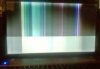
Acer Aspire V3-731 Screen showing lines at bootup
Hi everyone. Forum Newbie here. Would really appreciate some advice here please....
I have an Acer Aspire V3-173, that when booting up, shows a black screen for the top 3/4,
and lighter grey for the balance of the screen. After a few seconds it changes to
vertical lines and no further changes.
I have tested the connection to an external screen via the VGA port and this worked
successfully.
I have removed both 4GB RAM, started with them one at a time, in different slots as well.
I have opened it, checked that the screen cable (on both sides : motherboard and behind
the screen assembly) is correctly inserted and not damaged.
At the time of its failure, the laptop booted as normal and then changed to the black
screen, without any changes for the better since then.
Aspire V3-731
Intel B970 2.3GHz cpu
Intel HD graphics
17.3" LEC LCD screen
8GB DDR3
1TB HDD
Windows 7 Home
https://www.dropbox.com/s/tinbu3pfgcce0j1/screen.jpg
Hi everyone. Forum Newbie here. Would really appreciate some advice here please....
I have an Acer Aspire V3-173, that when booting up, shows a black screen for the top 3/4,
and lighter grey for the balance of the screen. After a few seconds it changes to
vertical lines and no further changes.
I have tested the connection to an external screen via the VGA port and this worked
successfully.
I have removed both 4GB RAM, started with them one at a time, in different slots as well.
I have opened it, checked that the screen cable (on both sides : motherboard and behind
the screen assembly) is correctly inserted and not damaged.
At the time of its failure, the laptop booted as normal and then changed to the black
screen, without any changes for the better since then.
Aspire V3-731
Intel B970 2.3GHz cpu
Intel HD graphics
17.3" LEC LCD screen
8GB DDR3
1TB HDD
Windows 7 Home
https://www.dropbox.com/s/tinbu3pfgcce0j1/screen.jpg