Acer TravelMate 800 Graphics Corruption

martnich

Geek Trainee
Hey everyone,

I have a graphics corruption issue with my Acer TravelMate 800. I have emailed Acer support a few hours ago but I thought I would post it here in case someone else has the same problem or someone knows how to fix it. Below is the email I sent Acer. By the way it has a 64MB Mobility Radeon 9000.

I will post what Acer say when/if they get back to me. But in the meantime any help would be greatly appreciated.

Regards,
Martin

Hello,

I have an Acer TravelMate 800. The exact model is the 800LCib I think. I have had an issue of graphics corruption for some time now. It went away at some point and then came back again which is why I am emailing you now. It first appeared about a year ago I would estimate, then disappeared for a while and came back. I am now officially annoyed with it and was hoping it would be a known issue and a fix would be available. I have taken photos with my digital camera and have attached them to this email for you to see the problem.

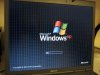
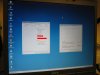
As I said the problem is graphics corruption. It is hardware related because it occurs at BIOS level (see 1.jpg and 2.jpg), and in multiple operating systems (Ubuntu and Windows). Have a look at 3.jpg which is the start screen of Windows. A similar thing happens for the Ubuntu splash screen but it is less harsh and so the photo did not show it very well, hence it is not attached. As it happens in multiple operating systems and at BIOS level it cannot be driver related. I also believe it is not the cable that connects the graphics adapter to the LCD monitor due to 5.jpg which shows the System Properties and Taskbar Properties in Windows – both of which should have pictures but do not! Also notice 4.jpg which shows graphical corruption around the mouse pointer in Ubuntu.

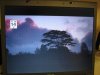
I could live with these defects to be honest. But when I watch movies on my laptop (using either Windows or Ubuntu) I get nasty lines down the screen resulting in an unwatchable picture – see 6.jpg for an example.

As I said the issue is hardware related. I have tried changing my system BIOS to other ones available on your site but none change the issue. None change the VGA BIOS version which is stuck at ATI M9 008.006.009. Is there a problem with this VGA BIOS? If not what is the issue? When at BIOS time with the Acer screen disabled (FastBoot I think) it has corruption until it says Video BIOS Shadowed (or something like that – it disappears pretty quickly!) then the corruption stops for a few seconds and then returns again.

I hope I explained the problem clearly enough so that you can diagnose the problem and find a solution.

Regards,
Martin
 

Attachments

  • 1.jpg
    1.jpg
    84.5 KB · Views: 3,273
  • 2.jpg
    2.jpg
    53.5 KB · Views: 457
  • 3.jpg
    3.jpg
    100.5 KB · Views: 481
  • 4.jpg
    4.jpg
    19.1 KB · Views: 436
  • 5.jpg
    5.jpg
    41.5 KB · Views: 591
  • 6.jpg
    6.jpg
    53.4 KB · Views: 471
First of all check it with a external Monitor to make sure that if its a graphics card problem or Notebook Screen... Other than that, it doesnt looks like any drivers problem or so as u stated in your email.
 
Acer got back to me with a shocking deal! Have to pay £40 just to have it diagnosed and no doubt some huge cost to have it repaired. Its not worth it!

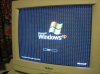
I tried it with an external monitor and had exactly the same issue (see photos). I'm assuming that means the graphics adapter in the laptop is not working. I saw a broken TravelMate 800 on eBay claiming that the graphics adapter had completely failed, but the rest was working. Is the Mobility Radeon 9000 easily broken or is it something Acer put in there?

But the most important question is can I repair it? I have much experience inside desktops and some inside laptops (used to be a network administrator). I'm assuming that the graphics adapter is a discrete chip inside a socket so I could swap it with one from another TravelMate 800 if I could get one on eBay. Anyone confirm if this is the case?

Maybe someone knows of a spares store where I can get a graphics chip for it??

Any help would be greatly appreciated. I can't afford a new laptop right now :-(

Hello, Thank you for contacting Acer.

Regarding your enquiry,

This would be classed as a chargeable repair, the process would be the following.

Your unit will be booked into our repair centre and a £41.13p charge taken from you before it is brought in for assessment. You will then be given courier details so that you may arrange collection of your machine for shipment to our repair centre. Once received in the repair centre it will undergo assessment by one of our technicians. They will draw up a written proposal for you containing full details about your repair assessment.

Your unit will then be returned to you with the proposal, this explains the cost of the parts and labour to complete the work. You then have time to decide if you want to go ahead with the repair. If you decide not to you already have your machine and can investigate other ways of having a repair completed. If you do want to go ahead with the repair you will need to contact us by telephone on the number below. We will take the payment for your repair and provide the details for the unit to be sent in again for the work to be completed.

Once the work is done your machine will be sent back to you. All repairs carry a three month warranty for the parts and labour.

If you would like to book your machine in for an assessment please let us know and we will make the necessary arrangements.

Regards
Paul
Acer Technical Support Team
 

Attachments

  • 7.jpg
    7.jpg
    68.4 KB · Views: 436
  • 8.jpg
    8.jpg
    90.6 KB · Views: 414
I couldnt find the technical manual for you Laptop but just for an example, you can check another Laptop Documentation Graphics card removing method. It might give you some Idea.
I would suggest you first just remove and replug in the same graphics card and then if it doesnt work buy a new one...
 
Sadly it is built onto the motherboard, so no real chance of repair :(

Cheers for the help though. I may keep an eye on eBay for faulty laptops but as I need a new motherboard chances are I won't get lucky!
 
Back
Top