Hey everyone,
I have a graphics corruption issue with my Acer TravelMate 800. I have emailed Acer support a few hours ago but I thought I would post it here in case someone else has the same problem or someone knows how to fix it. Below is the email I sent Acer. By the way it has a 64MB Mobility Radeon 9000.
I will post what Acer say when/if they get back to me. But in the meantime any help would be greatly appreciated.
Regards,
Martin
I have a graphics corruption issue with my Acer TravelMate 800. I have emailed Acer support a few hours ago but I thought I would post it here in case someone else has the same problem or someone knows how to fix it. Below is the email I sent Acer. By the way it has a 64MB Mobility Radeon 9000.
I will post what Acer say when/if they get back to me. But in the meantime any help would be greatly appreciated.
Regards,
Martin
Hello,
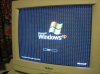
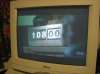
I have an Acer TravelMate 800. The exact model is the 800LCib I think. I have had an issue of graphics corruption for some time now. It went away at some point and then came back again which is why I am emailing you now. It first appeared about a year ago I would estimate, then disappeared for a while and came back. I am now officially annoyed with it and was hoping it would be a known issue and a fix would be available. I have taken photos with my digital camera and have attached them to this email for you to see the problem.
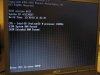
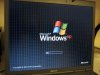
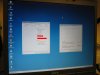
As I said the problem is graphics corruption. It is hardware related because it occurs at BIOS level (see 1.jpg and 2.jpg), and in multiple operating systems (Ubuntu and Windows). Have a look at 3.jpg which is the start screen of Windows. A similar thing happens for the Ubuntu splash screen but it is less harsh and so the photo did not show it very well, hence it is not attached. As it happens in multiple operating systems and at BIOS level it cannot be driver related. I also believe it is not the cable that connects the graphics adapter to the LCD monitor due to 5.jpg which shows the System Properties and Taskbar Properties in Windows – both of which should have pictures but do not! Also notice 4.jpg which shows graphical corruption around the mouse pointer in Ubuntu.
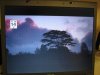
I could live with these defects to be honest. But when I watch movies on my laptop (using either Windows or Ubuntu) I get nasty lines down the screen resulting in an unwatchable picture – see 6.jpg for an example.
As I said the issue is hardware related. I have tried changing my system BIOS to other ones available on your site but none change the issue. None change the VGA BIOS version which is stuck at ATI M9 008.006.009. Is there a problem with this VGA BIOS? If not what is the issue? When at BIOS time with the Acer screen disabled (FastBoot I think) it has corruption until it says Video BIOS Shadowed (or something like that – it disappears pretty quickly!) then the corruption stops for a few seconds and then returns again.
I hope I explained the problem clearly enough so that you can diagnose the problem and find a solution.
Regards,
Martin