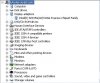
Hi, I just bought an e-GeForce 8500 GT and I installed it but when I go to Windows it doesnt show that I have a driver installed. I looked in the Device Manager and it was the same built-in Intel Family Chip that came with this computer. I went to the BIOS settings to look around and I couldnt find anything about VGA settings to disable the built-in graphic card.
I dont really think the problem is with the built-in graphic card, but I think the computer is not detecting that I have a graphic card installed at all, and the fan that is on it is working but it doesnt detect the device. Can I get any help? I called EVGA on (888)880-EVGA and it said that i have to check the area code and that the number doesnt exist. So I came to look for forums that might help me :)
BTW, my computer is this computer.
PS: I uploaded a screenshot of the device manager under the Display adapters.
I dont really think the problem is with the built-in graphic card, but I think the computer is not detecting that I have a graphic card installed at all, and the fan that is on it is working but it doesnt detect the device. Can I get any help? I called EVGA on (888)880-EVGA and it said that i have to check the area code and that the number doesnt exist. So I came to look for forums that might help me :)
BTW, my computer is this computer.
PS: I uploaded a screenshot of the device manager under the Display adapters.