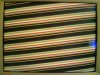
I have been experiencing these diagonal lines for the longest time - only now with a new (old) Evga geforce 7900 card. My first card was an XFX 7900 but on top of seeing those lines, I had texture tearing and image corruption.
With the new card, I no longer have the corruption/artifacting, but sadly this problem has carried over.
What happens is this: I'll open a game (any game) and everything will be fine. Menu > loading screen > then for a second, after the transition from loading screen to map, everything will be as normal. Then BAM! Diagonal flashing lines.
My only work around has been to hit CTRL+ALT+DEL back to the desktop, and then finally back into the game. Usually this is tolerable, but if I'm playing a game like The Witcher, loading screens from environment to environment are very common. Without fail, I'll lose resolution and have to refresh with a painful trip back to the desktop to get things right again.
I've searched the internets for a solution but all I've come across are suggestions to overclock the card slightly because of some memory defect common with this series of GPUs.
I'm using an ancient CRT which may have something to do with it but cannot confirm this without plugging something else in. Unfortunately, money is tight and I don't have access to anyone with an LCD or otherwise.
I appreciate any help you guys can offer...
With the new card, I no longer have the corruption/artifacting, but sadly this problem has carried over.
What happens is this: I'll open a game (any game) and everything will be fine. Menu > loading screen > then for a second, after the transition from loading screen to map, everything will be as normal. Then BAM! Diagonal flashing lines.
My only work around has been to hit CTRL+ALT+DEL back to the desktop, and then finally back into the game. Usually this is tolerable, but if I'm playing a game like The Witcher, loading screens from environment to environment are very common. Without fail, I'll lose resolution and have to refresh with a painful trip back to the desktop to get things right again.
I've searched the internets for a solution but all I've come across are suggestions to overclock the card slightly because of some memory defect common with this series of GPUs.
I'm using an ancient CRT which may have something to do with it but cannot confirm this without plugging something else in. Unfortunately, money is tight and I don't have access to anyone with an LCD or otherwise.
I appreciate any help you guys can offer...