tobsta
Geek Trainee
I have a GeXcube radeon 9600xt video card which has been overheating and causing my games to crash.
I took the heatsink off the card and found it had quite a thick termal pad. I pulled this off and applied a thin layer or thermal paste on the core. I put the heatsink on and then pulled it off again to make sure it was touching the heatsink. It wasn't! in the end i ended having to put a quite thick layer of paste on for it to get to the heatsink.
The heatsink has like sticky pads on the sides, about five which stick on to different chips around the card. I didnt bother with these because they didnt look like thermal compund. I think this is what is rasing the vard to high.
The card actually idles at a higher temp now and games crash lots faster.
What do you recommend?
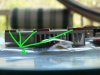
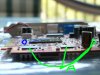
Here are some pics. I have labled the thick thermal pads as "A" and the core as "O".
Hopefully somebody can tell me what i should do. :confused: :(
I took the heatsink off the card and found it had quite a thick termal pad. I pulled this off and applied a thin layer or thermal paste on the core. I put the heatsink on and then pulled it off again to make sure it was touching the heatsink. It wasn't! in the end i ended having to put a quite thick layer of paste on for it to get to the heatsink.
The heatsink has like sticky pads on the sides, about five which stick on to different chips around the card. I didnt bother with these because they didnt look like thermal compund. I think this is what is rasing the vard to high.
The card actually idles at a higher temp now and games crash lots faster.
What do you recommend?
Here are some pics. I have labled the thick thermal pads as "A" and the core as "O".
Hopefully somebody can tell me what i should do. :confused: :(