

I just purchased and installed a 256mb PCI FX5500 video card. My Primary video card is a 8800GTS
I am able to use both the FX5500 or the 8800GTS fine separately with windows 7.
When I try to install either card while using the other then I get one of two errors - either Windows has stopped this device bacuase it has reported problems. (Code 43) or The device cannot start (Code 10)
System Specs:
Nvidia PCI-E 8800gts graphics card
Nvidia PCI FX5500 graphics card
2GB RAM
ASUS m4n78 mother board
X6 1055t CPU
Troubleshooting already tried
>Putting the FX5500 video card in a different PCI slot
>I have tried uninstalling and installing the FX5500 PCI card with both the default windows 7 driver and the latest nvidia driver several times.
>Updated both video cards to the latest driver
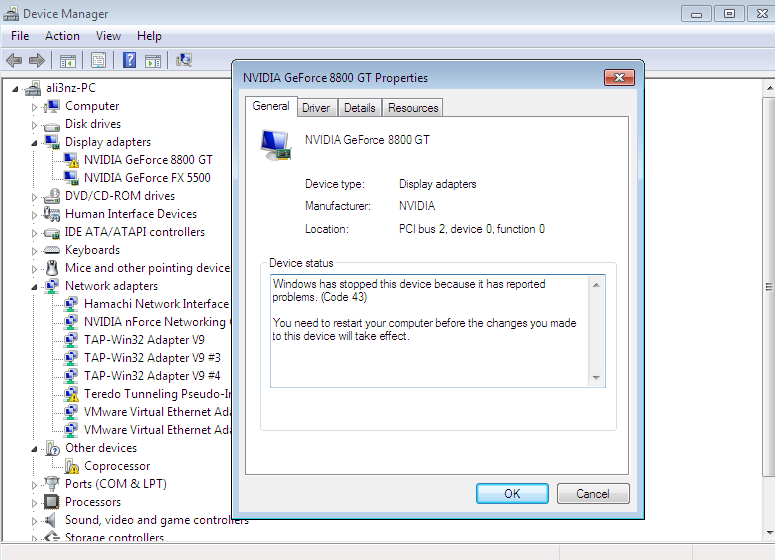
Any ideas?
I am able to use both the FX5500 or the 8800GTS fine separately with windows 7.
When I try to install either card while using the other then I get one of two errors - either Windows has stopped this device bacuase it has reported problems. (Code 43) or The device cannot start (Code 10)
System Specs:
Nvidia PCI-E 8800gts graphics card
Nvidia PCI FX5500 graphics card
2GB RAM
ASUS m4n78 mother board
X6 1055t CPU
Troubleshooting already tried
>Putting the FX5500 video card in a different PCI slot
>I have tried uninstalling and installing the FX5500 PCI card with both the default windows 7 driver and the latest nvidia driver several times.
>Updated both video cards to the latest driver
Any ideas?