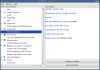
Drivers aren't really an issue, as Mandrake 8.0 and up fully supports Creative Labs sound cards up to the PCI 512. Mandrake 9.0 and up fully supports all Creative Labs cards based on the EMU10k1 chipset, which includes all Live/Audigy cards. However, there is still a slight matter of configuration. With Mandrake, this is certainly an easy, but there are a few nuances. There are two different sound subsystems that bundle with Mandrake (and most *nixes).
OSS (Open Sound System) is the standard sound module for most versions of Linux (up until kernel 2.6). OSS has been around forever. It gets the job done, but offers minimal features and performance. However, Mandrake 9.0 and higher bundle with ALSA (Advanced Linux Sound Architecture), which is fast, responsive, and packed with features. I'd venture to say that it's superior to Window's sound subsystem.
To recap, OSS is the standard architecture, but ALSA is superior. When you choose a sound driver, make sure you choose an ALSA driver. That way you make use of your ALSA sound module, and get the best possible sound performance out of your system. Once you've got that squared away, you just have to set the volumes and mix the bass and treble of your card using Kmix (assuming you're using KDE as your desktop environment). If you're using Gnome or something else, you'll want to use the ALSA sound mixer.