
Install the app
How to install the app on iOS
Follow along with the video below to see how to install our site as a web app on your home screen.

Note: This feature currently requires accessing the site using the built-in Safari browser.
You are using an out of date browser. It may not display this or other websites correctly.
You should upgrade or use an alternative browser.
You should upgrade or use an alternative browser.
Unix making directory trees
- Thread starter Swansen
- Start date

Anti-Trend
Nonconformist Geek
The image you linked is a totally different type of directory tree... not the same type of directory at all. You're talking about directories as in filesystem directories, whereas this is a database style directory ala Lightweight Directory Access Protocol - Wikipedia, the free encyclopedia

RHochstenbach
Administrator
I think that you need to browse to the directory where you want to create multiple folders. For example:
And then create every folder seperately.
Code:
cd /folder1
Code:
mkdir 01
mkdir 02
mkdir 03
Anti-Trend
Nonconformist Geek
I think that you need to browse to the directory where you want to create multiple folders. For example:
And then create every folder seperately.Code:cd /folder1
Code:mkdir 01 mkdir 02 mkdir 03
Actually, Swansen actually had it better already:
Code:
mkdir -p work/homework/ch1/ch2To answer the question, the only thing I can think of would be a 'for' loop. In other words, simple scripting. But it'd be a pretty unusual situation when you'd need to do something like that, hence my relative ignorance... out of curiosity, what are you trying to do?

sabashuali
Ani Ma'amin
Just out of curiosity - do you issue the
Or is the first command doing both actions in one go, i.e. creating the parent directory work/homwork and then two sub directories ch1 and 2?
If so, how does it know which is the parent directory? work, homework, ch1 or ch2?
Cheers! :cool:
after you already createdSwansen said:mkdir -p work/homework/ch1/ch2
?Swansen said:mkdir work/homework
Or is the first command doing both actions in one go, i.e. creating the parent directory work/homwork and then two sub directories ch1 and 2?
If so, how does it know which is the parent directory? work, homework, ch1 or ch2?
Cheers! :cool:

Swansen
The Ninj
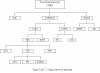
Specifically, i need to make the tree in the attachment. I did what donkey did only without the &&, so that was the missing link there. I found something similar to what Sniper is using there, but i was unsure of how to use the brackets. () I'm guessing they designate subfolders??
Attachments

donkey42
plank
i havn't tested it but we were both thinking alike
should in theory create your dir structure
Code:
cd ~/
mkdir -p /temp /professional/courses/major/cs381/labs /professional/courses/major/cs381/notes /professional/courses/major/cs381/programs /professional/courses/major/cs213 /professional/courses/major/cs475 /professional/courses/general /professional/societies/iee /professional/societies/acm /personal/funstuff /personal/taxes
the curly brackets allow you to create multiple sub-folders in the target directory
say you wanted to create
parent -> child 1
parent -> child 2
easier but longer way
instead you would do
oh and your full tree, not as readable
say you wanted to create
parent -> child 1
parent -> child 2
easier but longer way
Code:
mkdir -p parent/child1 && parent/child2instead you would do
Code:
mkdir -p parent/{child1,child2}oh and your full tree, not as readable
Code:
mkdir -p YHD/{temp,personal{/funstuff,/taxes},professional{/courses{/general,/major{/cs213,/cs475,/cs381{/notes,/labs,/programs}}},/societies{/ieee,/acm}}}donkey42
plank
i second thatSwansen said:awesomeness, thank you

donkey42
plank
your mind is blown!, my head was a shed after that[ot]donkey is still searching for paracetamol[/ot]Fred said:My mind is blown :-O