URGENT! Need Hitachi Deskstar 80.4GB

rzea

Geek Trainee
Hello everyone, happy new year to all...

Well, not so happy to me, I lost my most important hard drive a few days ago and I need to replace the logic board.

These are the characteristics of the drive I need:
  • Hitachi Deskstar
  • Capacity: 80.4GB (80.0 nor 82.3 would work, it HAS to be 80.4)
  • Model Number: IC35L090AVV207-0
  • ATA/IDE
  • P/N: 07N9685
  • LBA: 160.836.480 sectors
  • RPM: 7200RPM
  • MLC: H69205
  • CHS: 16383/16/63
  • Date: FEB2003 - N155
  • S/N: G3C57XKD

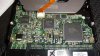
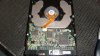
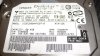
I'm attaching close up pictures of the label and the PCB.

I've looked on eBay too but it's impossible to find this type of drive there.

I'm really desperate and need your help.

Thanks a lot everybody.
 

Attachments

  • hitachi-deskstar-80.4gb-01.jpg
    hitachi-deskstar-80.4gb-01.jpg
    52.6 KB · Views: 312
  • hitachi-deskstar-80.4gb-02.jpg
    hitachi-deskstar-80.4gb-02.jpg
    63.1 KB · Views: 295
  • hitachi-deskstar-80.4gb-03.jpg
    hitachi-deskstar-80.4gb-03.jpg
    60.8 KB · Views: 304
probably the easiest way to replace the logic board is to buy an identical HDD and swap the logic board from that HDD

what happened anyway, and what is the HDD doing now & how do you know the logic board has failed
 
Thanks for your reply.

Well, I posted here because I have tried all over the Internet already to buy a drive exactly like mine, but since it's a 2003 drive no one carries it now.

My drive with is original board does not turn on.

I bought two other drives on eBay, VERY similar to mine but not 100% the same, they both are 80.0GB EXACT capacity not 80.4GB (those have been the closest drives I've been able to find), and although the drive turns on now my PC doesn't recognize it either. I tried it as a slave on an IDE port and in my USB case and it doesn't get recognized by Windows.

I tested my USB case with a drive that works inside my PC and Windows immediately recognizes it.
 
I fixed my drive, I replaced the PCB and it worked perfectly :D

So the things I learned that needed to be considered when finding this new drive I were:

* Brand (duh)
* MLC: H69205
* P/N: 07N9685
* Model Number: IC35L090AVV207-0
* EXACT Capacity: 80.4GB (80.0 nor 82.3 would work, it HAS to be 80.4)

These 5 characteristics need to match, otherwise the PCBs you use won't work.

Thanks to all,

Zuertex
 
the "quoted" capacity of a drive is actually the unformatted size (quoted by the manufacturer) when a drive is formatted you loose about 13% of the actual unformatted size, some of the space is taken up by error checking stuff

BTW: glad you fixed it & thankies for posting the results, cos then other HWFs can follow your advice
 
Back
Top