Today I took out a standard CD-Rom Drive and when I unplugged the power supply to the cd-rom drive on of the pins from the CD-Rom Drive came off!
Now, It was a mistake, the drive had been in that pc for 4-5 years! I’ll show you what I mean. This is a picture of the cd-rom drive power supply:
Today I took out a standard CD-Rom Drive and when I unplugged the power supply to the cd-rom drive on of the pins from the CD-Rom Drive came off!
Now, It was a mistake, the drive had been in that pc for 4-5 years! I’ll show you what I mean. This is a picture of the cd-rom drive power supply:
Can someone please tell me how to get this :swear: thing out! :guns:
Thanks in advance.
Brendon
[/QUOTE]
I suggest using a pair or tweesers (the things girls use to pull the hair from their eyebrows) they would be good at this - oh and some patience.
Make sure you disconnect power leads or any connectivity at all before doing this.
Otherwise what u can do, is get a stanley knife and cut the top piece of plastic above where the pin is stuck and then pull it out that way once u’ve cut a slit over the top of it, then just use a heated metal object such as a spoon or knife to seal the plastic back together once its out.
Please becareful and do not do this unsupervised. - Be patient and make sure you do it on a hard surface.
you have the holes in the plastic connector in your photo, in one of these holes your pin from your cdrom is lodged inside or stuck. cut directly above on of the holes a line in the plastic, so that u can get alittle bit more of a leverage.
The worst that will happen is ull have to use another connection that your not using, or buy another PSU.
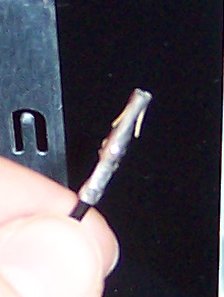
I attached a pic of a power supply pin that may help. Notice the two tabs bending outwards. That’s to keep the pins in the connector, you can take a small knife or whatever and push them back inside the pin, and then pull the cable through the connector. You should be able to get the cdrom pin out and then bend the pins out again to push it through the connector.