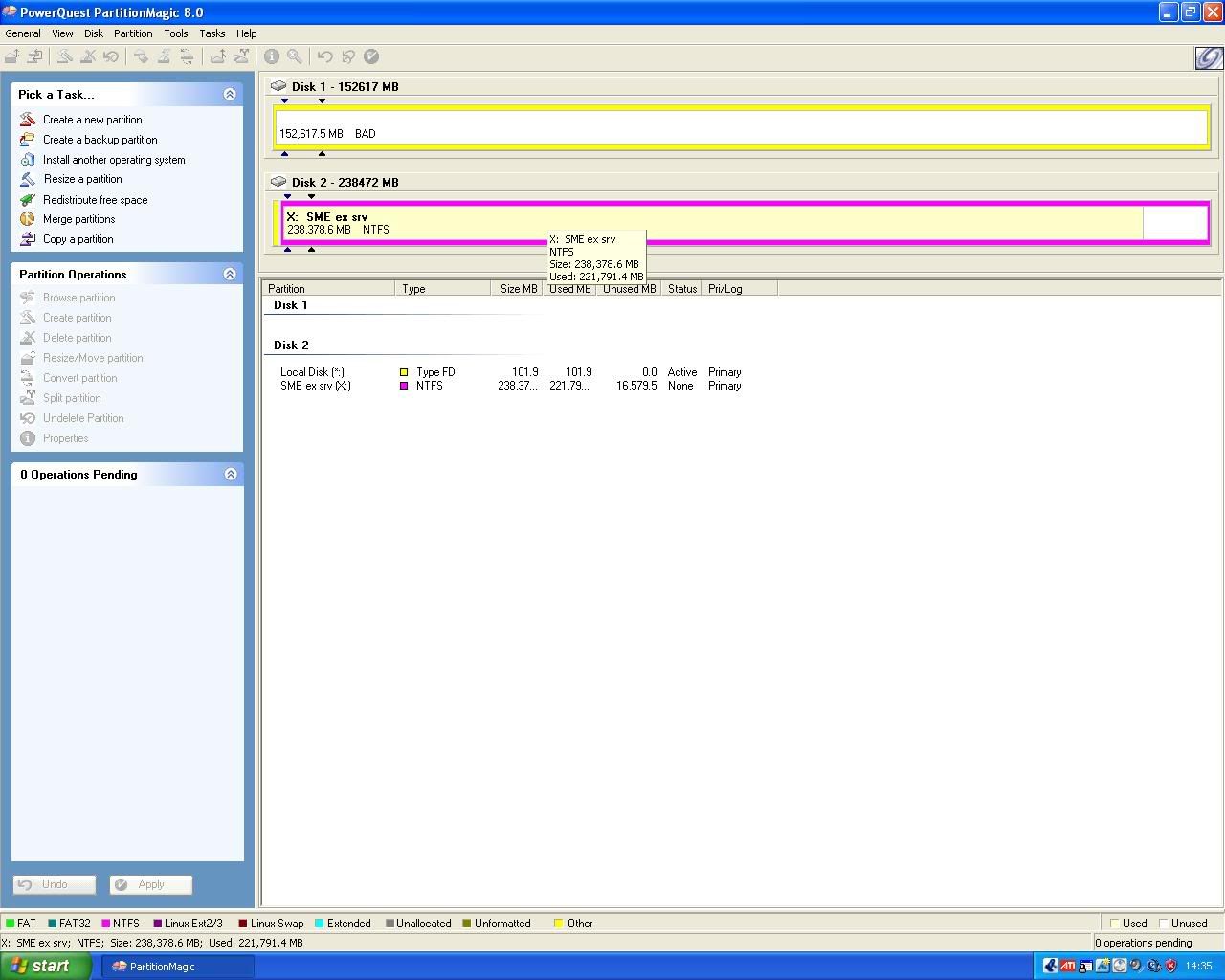
Hi, i need to create another partition, but the problem is, my main hard drive which has 4 partitions on it is just reading as one big block with BAD in it, now i had this before, i resorted to deleting all the partitions and formatting that disk, this is somthing i do not want to do, is there any other way around it, anyway to pinpoint whats causing the BAD partition table problem and fix it withought deleting partitions and formatting a disk?
dont use partition magic, it is so shi*. it detroyed all of my data whilst merging two partitions forcing me to format and install windows agen. it can up with sum stupid errors and just pis**d me off. avoid it.
well i need to use somthing like it, this too has happened to me, and it was on the same partition as i am using now, partition magic crippled the partition full of about 150GB of data, i had to use lots of data recovery stuff to get it back, but right now i am trying to follow a tut to get me a swap partition, so page file is on a diffo drive and partition, it seems preety good, just i neeeeeeeeeeeeeed to make a 500mb partition out of the 230gb one i have now, i could always stick another 20gb HDD in my pc, but that would be 3 hard drives, more wires, more mess!
nasty!
Have you tried using a SMART tool to see what the problem might be. If you’ve had this before it might the whole drive and not just an ill partition.
As to fixing it… I personally would format it and go from there. Its easy for me to say though cos I only have about 5gb of files! The rest of my stuff are programs already on cds.
ah, i was thinking about backing up all my data, would be usefull if i could afford Blue Ray, i wouldent have a problem then, but my 250gb hdd only has 18GB left on it and there aint no change of backing it up, i would if i had a 300gb hdd, might buy one in a couple of weeks, the rest is full of data now, it wont make a new partition on it becouse of my 160gb hdd that has one whole bad partition table yet its 4 partitions, i cant reformat it, its got 2 windows xp and 1 vista on it, and everyhting works find, so i dont know what this BAD means :\
Nothing, says there all Healthy, i think Partition Magic is been retarded again, i think i need to use some other software, maybe Partition Magic has some serious problems?
Ok, i tried paragon partition manager, and it seems to be the other way around this time, it seems to recognise the HDD and all partitions within it that was showing as bad on Partition magic, but my main 233GB hdd is big red block showing INVALID now :s, whats going on
This is what it says about the Invalid HDD:
Partition 1, hard disk 1
Sort off out topic; I have all files on one partition and now I just got PM 8. I made a few partitions, and I want to distribute/organize the files in their appropriate drives/partitions, do you do it all manually(that would suck), or is there some sort of wizard that will help you transfer files to drives
if u havent got the data backed up, i would HIGHLY UNRECOMMEND using PM. it messed up my data and my friend used it and had a bit more luck but half of his files still got corrupted, deleted and were unusable.
it cud have been a coincidence with me but it happened to him aswell and ive heard many other bad stories on the internet and its just a f*cked up software
yea, I have cloned my entire hd, before using PM 8; I’m afraid of uninstalling it, since I have made partitions with it already; I’m just STILL trying to figure out how to transfer the files to the partitions I want them in
Copying and pasting, I think wouldn’t be a good idea, your programs would stop running since the root folder has changed
There has to be a wizard for transfering files somewhere!:cramp:
There is a partition explorer in PM8 and in Paragon Partition Manager. You can move files around in that. You can even move stuff to ext2/3 if you want.
Id just use windows copy/paste though. Surely its the quickest way to move stuff around anyway?
I gave up on PM8 myself and got partition manager instead. Its a lot better than PM8.
Willz, have you check your SMART report yet? If your getting errors on different partitions something isnt right.
sorry, I don’t see “Partition Explorer”, can you be specific on where it is
Also, won’t copying and pasting your folders in different drives, have your programs stop running, since the root folder has changed
Do you mean program directories? And Windows? I thought you meant files. Even if you change the drive letter you can mess it all up so I doubt you can move partitions like that, but ive never tried so who knows. I suppose you could move a program directory because you can access the .exe from anywhere but I dont know how the registry would handle it. It will probably be unstable, it depends on whether the program accesses other files outside its directory on the same drive.
I haven’t got PM8 installed but if I remember right its in the start menu next to the PM8 shortcut. Maybe you didnt install it when you installed PM8?
well i think ur trying to keep ur os on the same partition and move ur porgrams to another one. that isnot possible becoz u will have to move ur os with it, it wud be the same as cut and paste which wudnt work so i guess its a complete reinstall
well, practically re-formatted my 160gb HDD, gues what partition magic did? possibly destroyed the boot loader and destroyed my os, i am going to try partition magic 7, 8 suks DONT USE IT YOU WILL REGRET IT!
i gotta resize my 250gb hdd partition now, there is no way i am letting partition magic 8 do anything with that :mad: