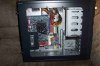
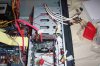
The wires coming from the top, are for your usb/firewire...and or mic input/headphone jack. Those are totally optional for you, but are very convenient. On each one of those cables...check to see if they are labled...they mite say, USB1, or USB2, or FIREWIRE/IEEE 1394. When looking in ur motherboard manual, there will be connectors to insert these labled wires into...also saying, USB1 or something like that...USB1 does not mean its usb1.1, just USB set 1. Again, those wires coming from the top or totally optional, if u have usb ports in the back, and or firewire, then u can worry about these wires after your computer is up and running.
The set that says, "ret r" L-out and mic..are for that mic port on the top of ur computer. Those were very confusing to me at first as well, as my mobo manual did not say what the wires with the case said..so i had to do some searching around for people that had a setup similar to mine. But...i suggest u worry about that later, as we want to get ur machine up and running, that is ur 1st priority.
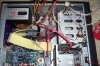
The PSU leads from the psu..that HUGE cable one that has 20 pings...its the huge cable in the picture that looks like it has snake skin...that connects to the huge connector on ur mobo that has 20 pins, 2 rows of 10...near the cpu...kinda transluecent looking..And that white one ur talkin about (4-pin connector)...that is for p4's, proving the extra power, that connector is located near the cpu also...but since u have no pentium4, dont worry about that connector.
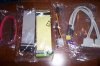
Your SATA hard drive only needs 2 connections to work, the red wire that came with the drive, one end goes to the motherboard, look in the manual to see where it has the SATA1 OR 2 connectins...then plug one end there, the other end goes to the back of the SATA drive, near the left end. Now that sata drive needs power...but a specific power cable...look on the leads from ur PSU for a connector that looks diff from all the rest, not including the ones we talked about above, it should be black, and very thin, and will connect near the cable u just plugged in a second ago to the drive, on it right side. I know this is a lot...but i believe i covered everything. I hope this helps u lots...provide more pictures if need be.